.png)
Requests made to TestRay REST API requires to be authenticated. The authorization we use is based on JWT, so you have to use a bearer token.
Important Notice!
Currently TestRay is running as ‘Connect app' (old) and ‘Forge app’ (new) frameworks in parallel, your TestRay server may run as either of them.
The REST API base URLs are different due to different frameworks, you can check TestRay version to know whether it is running as ‘Connect app’ or ‘Forge app’.
-
TestRay as ‘Connect app’: 1.0.xy-AC
-
TestRay as ‘Forge app’: 5.x.y
The REST API base URL for all end points:
-
TestRay as ‘Connect app’: https://testray.goldfingerholdings.onl
-
TestRay as ‘Forge app’: https://testray-forge.goldfingerholdings.onl
To generate your JWT, please use the URL "<base URL>/rest/testray/latest/public/authenticate" (GET request) with "Basic Authentication" using the API Access Token as username and Shared Secret as password. The validity of the JWT is 5 days from the time of generation.
-
Please add the JWT in "Authorization" header with the value "Bearer Token".
-
Please add a header with key "testray-api-token" and value "<Your API Access Token>" in all subsequent requests.
-
Please add a header with key "testray-api-jirauser" and value "<Your Jira User Id>" in all subsequent requests.
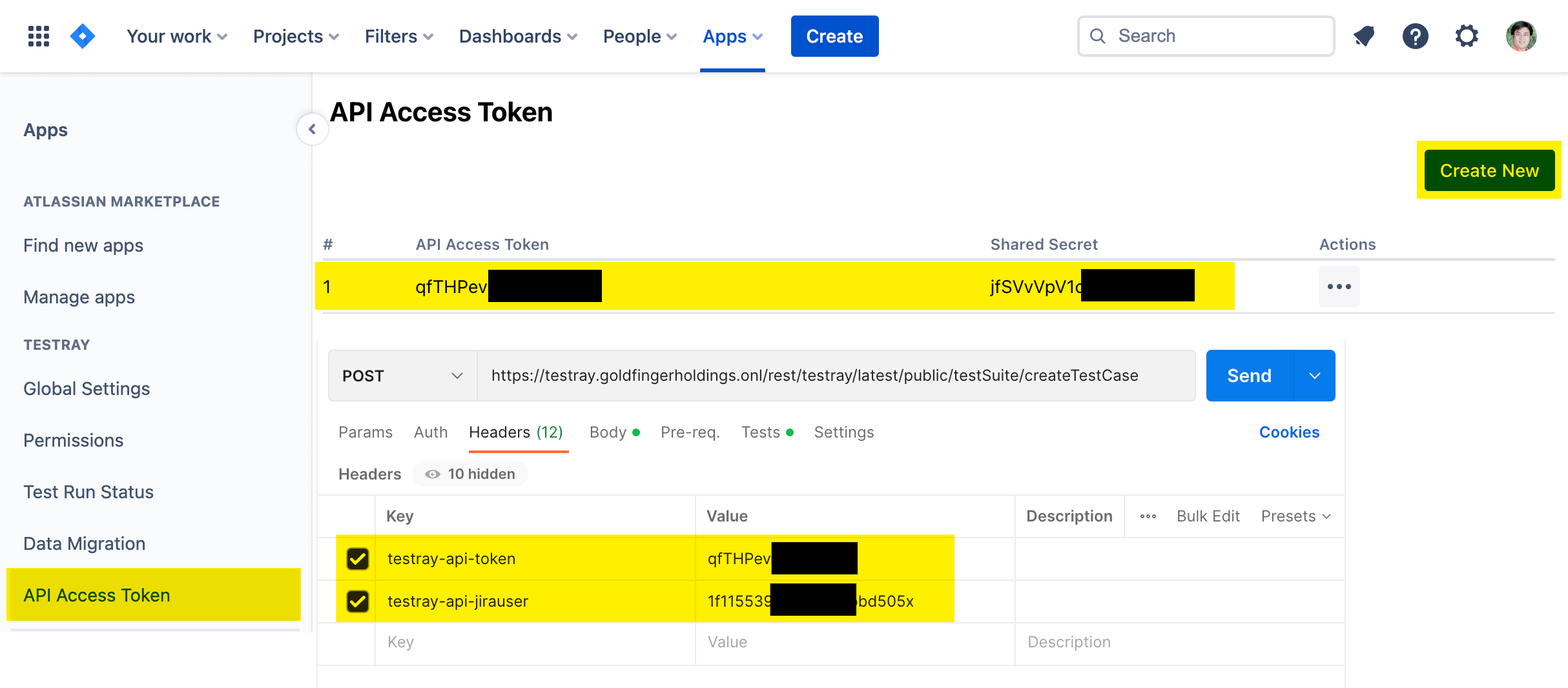
Please find the detailed steps on how to generate an access token from following page: API Access Token